
Wow! That month went quickly. There were several comments last month on sharing my Evernote experience so I thought this would be a good topic for all of us to share experiences, tips and applications. I am far from an expert on the use of Evernote, however I am only too happy to share with you how I use Evernote for my family tree research.
About five years ago when studying at Uni, one of the subjects that I chose was E-learning. At the time, I was had a fairly limited knowledge of social media and the interactive tools available to assist with communication, storing of ideas and collecting useful links and data from the Internet. In fact when I was working on a project, I would have a word document with a few related headings and under each heading I would copy the links of relevant documents, articles and books from the Internet. So my journey into blogging, social media, and the collecting and sharing of resources through the Internet began (and hasn’t stopped)!

The first “collector of data” that we were introduced to was Delicious.
I was so excited about it!! My research lists in word documents had been replaced!! I quickly set up bundles and tags relating to all the subjects I was researching at University, saving all documentation and online links of interest. This started to include my genealogy research as well.
Then about two years ago,while reading a newsletter from Paul Higgins “Whats Emerging” (which I would recommend to anyone who wants to keep up to date with new trends and innovations) I read an article on Evernote. It sounded like it would be the answer for collecting all my bits and pieces and putting them in some kind of logical order!! I was quite excited about using this new "App" and wrote a short blog on using Evernote. So after checking out the online site and watching a couple of their “about” and” how to” clips I downloaded the free program onto my laptop ,Ipad, work and home computers as well as my phone. (yep! a gadget queen!).
 The Evernote web page has numerous short"how to" videos, that clearly demonstrate the different functions that Evernote can provide. Also there quite a number of blogs that give advice and elaborate on how to use Evernote. I have provided a list of some of these below for your information if you are interested. I thought would be useful would be a brief description of how I set up my account specifically for my family research.
The beauty of Evernote is that everything is filed in Notebooks and Tags. To clarify this, the notebooks are the major files, and the tags are smaller files within the notebooks. To use Evernote to its full potential it is important to first establish the system that you plan to file/capture all the information you want to collect.
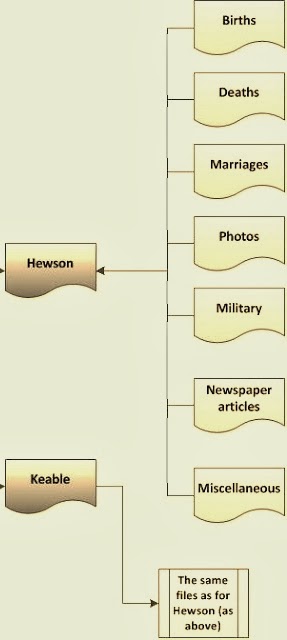
The system I have adopted is to allocate a Notebook to each branch of my family tree, using the surnames of my great grandparents. Then I use Tags to indicate the person/place that the document relates to as well as the type of document. ie James Hewson's birth certificate, would fit in the HEWSON notebook, and be tagged with two tags, James Hewson and Birth to indicate where the document/web page/photo if filed, (see diagram) If a document relates to more than one person then a tag can be added for both of people. When you set up your account with Evernote, you are allocated your personal Evernote email, that you can use to send photos and documents to your personal Evernote mailbox.
 |
| William Rushworth 1773-1859 |
Last year I went to the United Kingdom to research our family tree. Evernote, certainly came into its own on this trip. Here are some examples of how I utilised its features.
- Travelling – For my genjourney I save copies of itineraries, tickets, accommodation bookings, lists of points for interviews, lists of people/places I want to research, contacts and check lists into Evernote for easy reference.
- Interviews - Saved a list of prepared questions for reference when visiting family. Interview notes can be sent to your Evernote account immediately and if you make a recording of the interview, the audio file can be saved in Evernote in the appropriate family notebook.
- Photos and Documents - During my time in the UK I took hundreds of photos of churches, gravestones, family homes, as well as documents and records from libraries, interview notes from interviews, using my camera, phone and Ipad. If I used my phone or Ipad, I could immediately send the image to my Evernote account using the my Evernote email address.
- Notebook and tags - When you email these photos to your account, they can be filed immediately into the appropriate Notebooks with associated Tags, filing them immediately for later reference. This can be done by using “@” symbol followed by the name of an existing Notebook to the end of the subject line, then to link with an existing Tag can also be done by adding “#” and existing tag name. For example, for the picture of William Rushworth's gravestone, I would send it to my Evernote Account with the subject line "William Rushworth 1773-1859@Rushworth#photo#gravestone". (Note: if you don't have time to provide the appropriate Notebooks and Tags, you can just send it to your Evernote Inbox, and it will be there for you to categorise at a later date.)
- Reminders/dates - You can also add a reminder to your email by adding an exclamation (!) to your subject line, or the word "tomorrow" or a date wiith the numeric year, month and day in the form 2014/12/03. This reminder will come up on your screen on the appropriate date as a reminder.
- Libraries/Museums - Using your phone or Ipad, you can take photos of the covers books or articles you would like to read at a later date. I also took photos of displays on local history that I came across in local libraries/churches and museums. On a number occasions I came across Maps information about the life and times of my ancestors, so I took photos of these as well and sent them though to my account. Tip: When taking a number of related pictures, I would take a photo of a relevant sign, i.e. street sign, church sign, to help with identification at a later date.
- Brainstorming - When I was travelling, I often drew mind-maps and time-lines, showing all the information I had collected on a family group I was researching, to try and identify the gaps, I would then send this to Evernote for later reference.
- Collaboration - I was in contact with a number of other researchers who were researching the same family tree, and through Evernote, I was able to share all my discoveries by sharing the appropriate Notebook and they in turn could add/share their research notes to the same notebook.
- Finally- a new discovery!! While I was looking into the new applications for Evernote this week I found a new application that is quite exciting. That is Voice2Notes, this can be downloaded to your phone and will turn your voice messages into text. I have yet to use this, but can see its advantages.
I do believe that Evernote has managed to capture quite a number of research applications into one bundle that can be easily used anywhere, anytime. Once you are familiar with using the apps, they become second nature and an integral part of your research process. A long way from my original practice of saving the URL links of articles in into a word document! I am still learning and refining my Evernote skills, and would be very interested to hear the experiences and tips from other users.
Remember this is not restricted to your family tree research, create notebooks for wines you like, books you want to read, recipes that you want to collect, shopping lists, the applications are endless and only limited by your imagination.
____________
Resources/Links
Evernote: Video Library - lots of how to information .http://evernote.com/video/
Thomas MacEntee, Evernote Your Virtual Genealogy Assistant, http://www.archives.com/experts/macentee-thomas/evernote-your-virtual-genealogy-assistant.html
Cyndi's List: Evernote for every Genealogist - How to Use Evernote (list of very informative blogs) ,http://www.cyndislist.com/evernote/how-to/
Jordan Jones, How to use Evernote for Genealogy, http://blog.evernote.com/blog/2012/11/19/how-to-use-evernote-for-genealogical-research/
