Showing posts with label Evernote. Show all posts

Thursday, 6 April 2017

Watching April and Other Distractions


April the Giraffe
Youtube Live Feed

All over the world people are watching a giraffe named April as we wait for her to give birth to her 4th calf.
It was supposed to be in March they said, don't tune out you will miss it they said....here it is the beginning of April and we (read that ME) are still watching!
I have her next to me as I research, well, as I try to research.
Then something catches my eye...oh, what's she doing now? Is that a contraction? Why is someone in her pen?
Oh, look, they are feeding her carrots!
 Arg!!

 We all get distracted and go down rabbit holes or chase after that darn squirrel every once in a while!
It happens when we get an email with a new DNA match or a message from a cousin who has information we need to take a brick out of a wall.
 It can be a Bright Shiney Object (BSO) in the form of a new DNA tool, an update to your genealogy computer program with new features to play with, or a new app to learn.
Some days things just don't get done as we fall in those holes, chase those clues and are blinded by the sparkly.
Our to-do lists don't get to-done.

There are a few things that have helped me stay focused and on track.

First, I set up a schedule for the day. What and when I am going to work on certain tasks. It is a flexible plan that can be tweaked as the day moves forward. The schedule may show two hours to work on a particular project, but sometimes, ideas flow, and there's a need to extend a little instead of stopping to work on something else.

Second,  I looked for tools that help me stay on track with my day and my projects. I use Evernote, Trello and Google Calendar.
These hold my schedules, notes and to- do lists and checklists. They each can be used on my computer and on my tablet and smartphone to be consulted where ever I am.
Trello boards are a great project management tool and help me to plan step by step in order to complete assignments and tasks.
I review them before getting to work to help me know what to do with my allotted time.

Have you ever decided to use a time management program or app, put all your info in it and then never open it?
A system and a routine for when I check my tools and what action to take helps me to use them to get the full benefit and be productive throughout the day.
In the morning my Google calendar events and Evernote to do lists and help me remember what I have to do.
In the evenings, it's nice to go over my schedule for the day and see the things that I have worked on and perhaps completed before planning the next day.

To all of this, I have added a Bullet Journal. Writing down my daily, weekly and monthly tasks has helped to process what I need to do and the best way to get it done. These items are then placed on my web based tools for easy access everywhere.

I have been trying harder to not go off the path after those BSOs and slide down deep rabbit holes. The goal is to add them to my to-do lists and project schedules.

I said I have been TRYING-but some days, you get this

April Saying Hello!


and it's so hard to look away! "Giraffe, Giraffe"!!


What helps you stay on track and focus on finding your family?

Helping you climb your family tree,
Cheri

Monday, 25 July 2016

Incorporating Evernote into My Research Process

I'll admit it. I'm lazy, especially when it comes to transcribing records and creating source citations. Yet, when I begin to write a blog post or a magazine article, I rue the fact I haven't transcribed the associated records. Typically, if I have not already transcribed a record I do so in preparation of writing a blog post. This is when I create the source citations as well. Thankfully, I am good about noting where I found the record.

Since Ancestry revamped its interface, I have been dissatisfied with how transcriptions of documents are displayed. I find them very hard to read. (I'll admit I wasn't thrilled with "old" Ancestry, but new is definitely a step backwards.)

This is a source citation I created from a non-Ancestry.com document I found on ScotlandsPeople. When I click the source link from the Sources column on the facts tab, the text is all jumbled and difficult to read:

Citation details of Robert Orr Muir's 1917 death registration; citation created by
me; image courtesy of Ancestry.com

If I go to the Gallery, where I used to be able to easily read the text transcription, I can no longer do so. I have to click the edit button and scroll through a small text screen.

Death Registration document in the Gallery; image courtesy of Ancestry.com

Transcription is the bottom field. Certainly cannot see much!
Image courtesy of Ancestry.com

So I am beginning to incorporate other tools into my research process. The first one with which I began experimenting is Evernote. Currently, I am using it only for transcriptions and I quite like it. I can also see where the Web Clipper functionality will be very useful for staying on task. If I see something I want to investigate further, I merely have to clip it and add it to my To-Do Notebook to work on later.

After transcribing the record, and attaching an image of the record, I click Share >> Copy Public Link:

Image courtesy of Evernote

Then I add the link to the transcription to Ancestry as a web link:

The link to the Evernote transcription of Robert Orr Muir's death registration
I added to his Ancestry.com facts page

This is not the entire Evernote "note" but it should give you an idea of how much better the display of the transcription information is than the two options Ancestry.com provides.

My Evernote public note about the death of Robert Orr Muir; image
courtesy of Evernote

I know I'm late to the Evernote party, but I would very much like to know how are you integrating Evernote with your your family tree software?

Monday, 2 March 2015

There's more than one way to skin a cat....

... and there is more than one way to "do genealogy".

Many family historians are hung up on "doing the right thing" but, just as there is more one way to skin a cat, there is no one right way to do genealogy. This applies to all stages of whichever research process we use and the tools we use to facilitate and record our research. It depends on why we are doing the research in the first place, is it just for fun, is it as part of a collaborative exercise with family or society members or is it to prepare a detailed report to fulfil a client contract? Constantly in my thoughts is the statistic shared by Curt Witcher at Rootstech 2015 that between 82%-90% of people who do family history do not belong to a Society but go it alone. While some of these folk will devour online genealogical educational opportunities and purchase many geneabooks and guides many of them will probably work happily in isolation. They will be doing family history research their way.

As for the Research Process I stick with the Australian one I have used for years, it can be applied to all things from making a peanut butter sandwich, to learning to ride a bicycle to genealogy research. I notice that Michael John Neill also advocates another oldie: Polya's Four Step Process which also appeals to me. I would suspect that most family historians don't follow a particular published process while others may follow one specifically developed for genealogical research.

I see at least one query each week in the online forums I inhabit that asks for suggestions on which is the best genealogy program to use. Most of the answers are suggestions on which particular program to use or avoid but do not address the issue of what unique features the programs suggested offer to fit the requester's individual needs. Of course beginners often don't know what they want out of a program, in this case I think they should avoid the software evengelists' suggestions and turn to a few trusted friends or members of their family history society for advice. Another excellent resource is Gensoftreviews, one could probably choose with confidence any of the programs that appear in this site's Annual Gold Award List. The pruned down free packages or 30 day trials from various vendors  also give one an opportunity to try before you buy.

Keeping track of one's research is another question that pops up regularly. The evangelists come out in force to answer these questions by suggesting their way as the only way but there are many ways. I would suggest that if you are confident with a means of recording (be it pencil and paper or on a computer) then use that or if you are up to a challenge then select and learn a piece of software that will do the job for you.

My genealogy software program is rather sophisticated so I am able to keep my research notes, research log and to-do items within the program. Before I switched to this program I used Excel or Google Sheets (if sharing with others) for these tasks, as I love spreadsheets I still use them for all sorts of geneatasks.

I am an Evernote junkie and use this tool for many personal tasks and a few geneajobs like managing my blogs and details of my genimates. It is an excellent tool for keeping track of your research and making it available on any device you may use but it takes a  while to become a comfortable and confident user. There are groups on Facebook and Google+ that can assist you with this.

If you find that you can organise efficiently and effectively with pencil and paper and are happy with that method then keep doing it your way. My advice is to find a method that works for you and use it consistently.Whatever works for you should be the bottom line.

Taming the paper and digital mountains of files we have created while researching is another hot issue. Do you have a huge Piling System that is crying out to be organised? If you can find whatever it is you need within a couple of minutes then that system works for you but what about those that take over once you turn up your toes? Will they be able to negotiate and make sense of your folders and files?

If you keep digital copies of your photos and documents in your genealogy software program and have them linked to appropriate individuals then others should be able to find and retrieve them. I haven't done this yet but my program copes admirably with this. I use a very simple system of Surname (and other) Folders for both my digital and physical files. This works for me but may not be sophisticated enough for other users (note to self - update four year old post - my filing system is dynamic). I ascribe to the KISS Principle (Keep it Simple Sweetheart - I prefer Sweetheart to Stupid ). I would suggest that whatever system you use is easy to adapt as your needs and experience grow.

Storing those valuable original documents safely should be a priority. Make sure they are digitised and that your digital files are backed up in several places.

And then there is sharing. I am an advocate of Geneablogging for sharing ancestor stories and putting out Cousin Bait. To this end I also have a personal website where I share the details of my ancestors, both of these have brought me valuable cousin connections. I have concerns with printed family histories because they are not dynamic like online publications. Recently Mr GeniAus used my research to compile a written history for his brother's significant birthday. The delight and interest of my brother-in-law and family as they perused the publication demonstrated the value of providing  family members with a printed version of their family history. However you do it please record your family stories in a format that will survive and be accessible for future generations.

So what I have been banging on about for the past few paragraphs is that there is no one correct way to "do family history". I hope that, as members of a collaborative and supportive community, we respect the efforts of our fellow researchers no matter which way they approach their research.

As individuals we should approach our study of family history in a way that suits our personalities and purposes.

Tuesday, 29 April 2014

To do lists in Evernote


I have enjoyed reading how others use Evernote to help with their family history research.

Screenshot from my desktop version
My main collecting point for my family history is my tree on ancestry.com synched with a tree on my desk top computer using Family Tree Maker and also on my iPad using the ancestry.com app.

For research projects though I use Evernote. In particular if there is a book, a manuscript, a database I want to look up and explore I add it to Evernote with the questions I want answered and tag it with the relevant surname  and the repository plus to do.

The same to do list on my phone - I can click on a note to bring up the content
For example if there is a manuscript in the State Library of Victoria, I will tag it with SLV to do. When I get down to the SLV then all my to dos can be grabbed together by retrieving notes that are tagged. Once I have completed the to do I might collect my findings against that note and updating the tags by removing the to do tag but replacing it with the repository, ie the tag SLV to do is replaced with SLV.

I use this for interstate repositories too, for example the State Library of South Australia which I get to visit less than once a year. It is really useful to have collected in advance all the things I want to achieve there as I think of them.

Evernote is synchronised across my desktop computer, my iPad and my android phone. Thus I have my to do list with me all the time.

See also  Diane Hewson's post in February on collaborating with Evernote: http://worldwidegenealogy.blogspot.com.au/2014/02/evernote-collaboration-sharing-of-tips.html


Sunday, 9 February 2014

Evernote Collaboration- Sharing of tips and experiences

Wow! That month went quickly.  There were several comments last month on sharing my Evernote experience so I thought this would be a good topic for all of us to share experiences, tips and applications.  I am far from an expert on the use of Evernote, however I am only too happy to share with you how I use Evernote for my family tree research.

 About five years ago when studying at Uni, one of the subjects that I chose was E-learning.  At the time, I was had a fairly limited knowledge of social media  and the interactive tools available to assist with communication, storing of ideas and collecting useful links and data from the Internet.  In fact when I was working on a project, I would have a word document with a few related headings and under each heading I would copy the links of relevant documents, articles and books from the Internet.  So my journey into blogging, social media, and the collecting and sharing of resources through the Internet began (and hasn’t stopped)!

The first “collector of data” that we were introduced to was Delicious

 I was so excited about it!! My research lists in word documents had been replaced!!  I quickly set up bundles and tags relating to all the subjects I was researching at University, saving all documentation and online links of interest.  This started to include my genealogy research as well.

Then about two years ago,while reading a newsletter from  Paul Higgins “Whats Emerging” (which I would recommend to anyone who wants to keep up to date with new trends and innovations) I read an article on Evernote. It sounded like it would be the answer for collecting all my bits and pieces and putting them in some kind of logical order!! I was quite excited about using this new "App" and wrote a short blog on using Evernote. So after checking out the online site and watching a couple of their “about” and” how to” clips I downloaded the free program onto my laptop ,Ipad, work and home computers as well as my phone. (yep! a gadget queen!).

The Evernote web page has numerous short"how to" videos, that clearly demonstrate  the different functions that Evernote can provide.  Also there quite a number of blogs that give advice and elaborate on how to use Evernote.  I have provided a list of some of these below for your information if you are interested.   I thought would be  useful  would be a brief description of how I set up my account specifically for  my family research. 

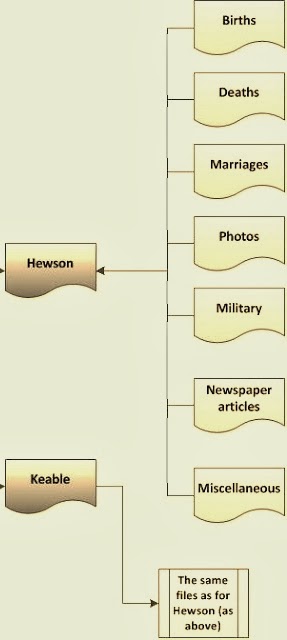
The beauty of Evernote is that everything is filed in Notebooks and Tags.  To clarify this, the notebooks are the major files, and the tags are smaller files within the notebooks. To use Evernote to its full potential it is important to first establish the system that you plan to file/capture all the information you want to collect. 

The system I have adopted is to allocate a Notebook to each branch of my family tree, using the surnames of my great grandparents. Then I use Tags to indicate the person/place that the document relates to as well as the type of document. ie  James Hewson's birth certificate, would fit in the HEWSON notebook, and be tagged with two tags,  James Hewson  and Birth to indicate where the document/web page/photo if filed, (see diagram)  If a document relates to more than one person then a tag can be added for both of people.  When you set up your account with Evernote, you are allocated your personal Evernote email, that you can use to send photos and documents to your personal Evernote mailbox.

William Rushworth 1773-1859
Last year I went to the United Kingdom to research our family tree. Evernote, certainly came into its own on this trip.  Here are some examples of how I utilised its features. 
  1. Travelling – For my genjourney I save copies of itineraries, tickets, accommodation bookings, lists of points for interviews, lists of people/places I want to research, contacts and check lists into Evernote for easy reference.
  2. Interviews -  Saved a list of prepared questions for reference when visiting family. Interview notes can be sent to your Evernote account immediately and if you make a recording of the interview, the audio file can be saved in Evernote in the appropriate family notebook.
  3. Photos and Documents - During my time in the UK I took hundreds of photos of churches, gravestones, family homes, as well as documents and records from libraries, interview notes from interviews, using my camera, phone and Ipad.  If I used my phone or Ipad, I could immediately send the image to my Evernote account using the my Evernote email address. 
  4. Notebook and tags - When you email these photos to your account, they can be filed immediately into the appropriate Notebooks with associated Tags, filing them immediately for later reference.  This can be done by using “@” symbol followed by the name of an existing Notebook to the end of the subject line, then to link with an existing Tag can also be done  by adding “#” and existing tag name.                                    For example, for the picture of William Rushworth's gravestone,  I would send it to my Evernote Account with the subject line "William Rushworth 1773-1859@Rushworth#photo#gravestone".    (Note:  if you don't have time to provide the appropriate Notebooks and Tags, you can just send it to your Evernote Inbox, and it will be there for you to categorise at a later date.)
  5. Reminders/dates - You can also add a reminder to your email by adding an exclamation (!) to your subject line, or the word "tomorrow" or a date wiith the numeric year, month and day in the form 2014/12/03.  This reminder will come up on your screen on the appropriate date as a reminder.  
  6. Libraries/Museums - Using your phone or Ipad, you can take photos of the covers books  or articles you would like to read at a later date. I also took photos of displays on local history that I came across in local libraries/churches and museums.  On a number occasions I came across Maps information about the life and times of my ancestors, so I took photos of these as well and sent them though to my account. Tip: When taking a number of related pictures, I would take a photo of a relevant sign, i.e. street sign, church sign, to help with identification at a later date.
  7. Brainstorming - When I was travelling, I often drew mind-maps and time-lines, showing all the information I had collected on a family group I was researching, to try and identify the gaps, I would then send this to Evernote for later reference.
  8. Collaboration - I was in contact with a number of other researchers who were researching the same family tree, and through Evernote, I was able to share all my discoveries by sharing the appropriate Notebook and they in turn could add/share their research notes to the same notebook.
  9. Finally- a new discovery!! While I was looking into the new applications for Evernote this week I found a new application that is quite exciting.  That is Voice2Notes, this can be downloaded to your phone and will turn your voice messages into text.  I have yet to use this, but can see its advantages. 

I do believe that Evernote has managed to capture quite a number of research applications into one bundle that can be easily used anywhere, anytime. Once you are familiar with using the apps, they become second nature and an integral part of your research process.  A long way from my original practice of saving the URL links of articles  in into a word document! I am still learning and refining my Evernote skills, and would be very interested to hear the experiences and tips from other users.

Remember this is not restricted to your family tree research, create notebooks for wines you like, books you want to read, recipes that you want to collect, shopping lists, the applications are endless and only limited by your imagination.
____________
Resources/Links

Evernote: Video Library - lots of how to information .http://evernote.com/video/


Cyndi's List: Evernote for every Genealogist -  How to Use Evernote (list of very informative blogs) ,http://www.cyndislist.com/evernote/how-to/


Thursday, 9 January 2014

Hi from Another Aussie Blogger

Hi all, firstly I would like to thank Julie Goucher and  Jill Ball for drawing my attention to, and inviting me to join the Worldwide Genealogy collaboration. I don't know about you, but I continue to be amazed at how the world of genealogy and family history research is advancing. Every day, new and innovative programs, social media  and access to more and more records and information becomes available. One of the keys to this advancement is the collaboration and sharing of information and ideas, so I am really thrilled to be involved in this new venture.

A little about me. I live in Sydney, NSW, Australia and work at The University of Technology, Sydney. Yes, another Aussie! I think I have been interested in our family history ever since I was a little girl! when my father used to entertain me with colourful stories of our family history as passed down from older generations. Stories of life on the gold fields, working in the timber industry, driving bullock trains and bushrangers! A collection of elements made to ignite the curiosity of a young girl.
 
 In my early twenties (such a long time ago) I began to seriously research our family history, collecting photos, stories, old letters, newspaper clippings, writing to extended family, searching cemeteries and visiting elderly relatives. The luxury of Internet research wasn't even thought of at this time.

For me the fascination of family research is more than the dates of significant events in family member's lives. I want to know what they thought, if they went to school, what work did they do, what significant social events affected their lives, why did they immigrate, how did they contribute to their community and so on! I believe it is this approach to family history that has led me to take up blogging. It provides me with a platform to share stories, discover connections and in my small way preserve some of our family history.
 
I started my first blog, Family Stories:Photographs and Memories, about two years ago, not really knowing where it would take me. It has been an interesting journey, with my interests, experiences and connections expanding continually. The realisation that most of the family stories that had been passed on to me were about my great grandfathers and great uncles led me to start a second blog, The Other Half of My Tree - stories of my female ancestors. I view both these blogs as a learning process and an opportunity to connect and share with those who are researching similar themes. I also have to admit that I often procrastinate, have so many stories to tell but as yet haven't put pen to paper.

As others have mentioned access to family research and genealogy is accelerating with amazing developments in new programs, social media and the opportunity to share and collaborate with others.  Let me share a couple of sites and tools that I have found useful. 

Evernote: I have found Evernote to be an extremely helpful tool for collecting all my family tree bits and pieces. You are able to tag and file articles, pictures and websites with appropriate family connections for further use and reference. On my recent trip to the UK I used Evernote to tag and file photos (taken with my IPad) of gravestones, church and street signs, family homes as well as interesting articles, maps and pages of books discovered while researching in the local library.

Pinterest: Besides being lots of fun, this visual tool is a great way to collect photos and links to articles and blogs on "boards". I have found Pinterest a rewarding method to share blogs and to link with other people interested in genealogy and family tree research.

Two web sites that are definitely among my favourite are TROVE and The British News Paper Archives. These web sites which are being continually updated, hold collections of newspapers from Australia  (TROVE) and the United Kingdom (British Newspaper Archives). Both of these sites have not only provided me with many clues in solving family tree links, but also allowed me to learn more about the times and events surrounding the lives of my ancestors.

Though I am an amateur genealogist come family tree researcher I am only too happy to share or assist others with their family tree discoveries if I am able. Looking forward to future interaction and collaboration!